
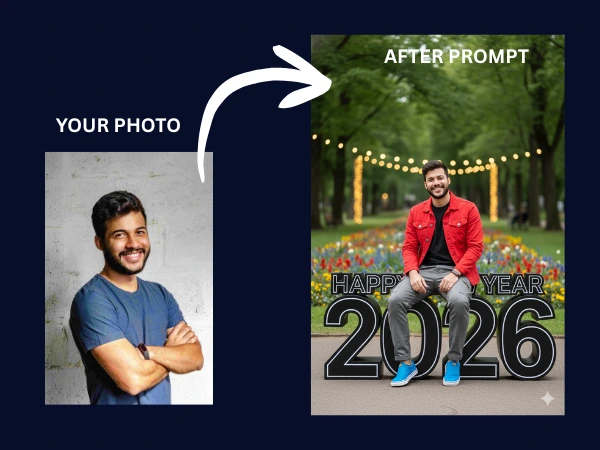

With 2026 approaching, personalized AI-generated greetings are becoming the trendiest way to celebrate. Using the power of Google Gemini and its advanced Nano Banana image generation model, you can now place yourself inside a high-quality, futuristic 3D scene.
In this guide, we will show you exactly how to use a professional prompt to generate a stylish “New Year 2026” portrait that looks like it was designed by a pro digital artist.
The Simple 3-Step Process
To get the best results—where the AI maintains your facial features while applying the stylish outfit and background—follow these steps:
- Open Google Gemini: Ensure you are logged in and using the latest version.
- Upload Your Photo: Click the image icon to upload a clear portrait of yourself. This acts as a reference for the AI.
- Enter the Prompt: Copy and paste the specialized prompt below into the chat box.
The Featured 2026 New Year Prompt
This prompt is engineered to balance “Futuristic” and “Natural” aesthetics, ensuring high contrast and vibrant colors.
Copy this Prompt: “A 18-year-old stylish man sitting confidently on top of massive, 3D ‘Happy New Year 2026’ numbers placed on a clean road inside a beautiful, lush park. The numbers feature a sleek, futuristic black outline with a glowing effect. The subject is wearing a black shirt, a vibrant red denim jacket, gray cargo pants, and stylish blue sneakers. The background is a picturesque park with green trees, colorful blooming flowers, and soft, magical bokeh lights. High-fidelity, 8k resolution, cinematic lighting, and realistic textures.”
Why This Prompt Works
- Confident Pose: By specifying “sitting confidently,” the AI creates a more natural and “cool” posture.
- Futuristic Contrast: The “black outline” on the 2026 numbers makes the text pop against the natural park background.
- Detailed Wardrobe: Specifying the colors (Red jacket, Gray cargos, Blue sneakers) ensures a vibrant color palette that stands out on social media feeds.
- Atmospheric Lighting: The addition of “soft lights” and “bokeh” gives the image a professional photography feel.
Pro Tips for Customization
Want to make it even more unique? You can easily tweak the prompt:
- Change the Age: Swap “18-year-old” for your actual age.
- Change the Outfit: If you prefer different colors, change “Red denim jacket” to “White leather jacket” or any style you like.
- Change the Location: Replace “beautiful park” with “New York Times Square” or “Cyberpunk City” for a different vibe.