
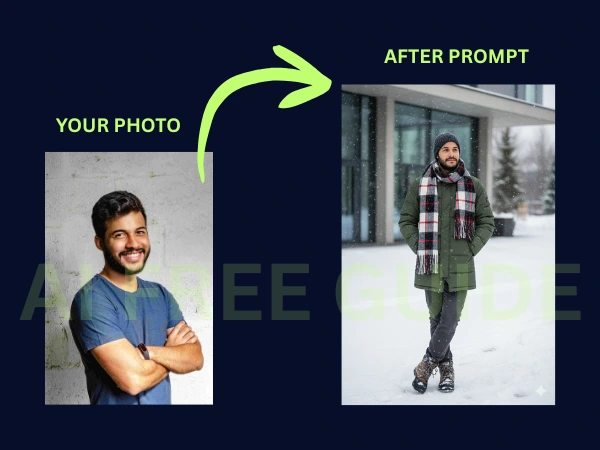
The “Cold Aesthetic” is taking the AI art world by storm. It’s a style defined by muted tones, crisp winter lighting, and hyper-realistic textures that evoke a sense of calm, chilly sophistication.
With Google’s Nano Banana technology now integrated into Gemini, you can transform a simple portrait into a high-end winter collectible that looks like it belongs on a gallery shelf. In this guide, we’ll break down the exact prompt and steps to achieve this “Cold Aesthetic” look.
🛠️ The Step-by-Step Guide to the Cold Aesthetic
To get this professional result, you don’t need to be a prompt expert. Just follow these three simple steps:
- Open Gemini: Ensure you are logged into your Google account.
- Upload Your Photo: Click the image icon and upload a clear, front-facing photo of yourself or a character.
- Apply the Professional Prompt: Copy and paste the specialized “Cold Aesthetic” prompt below.
The Featured Prompt: The Modern Winter Man
This prompt is engineered to capture the physics of fabric, the glisten of snow, and the unique lighting of a winter afternoon.
The Prompt: “Transform this photo into a stylized 3D figurine with a Cold Aesthetic. A man stands in the snow near a modern building, hands in his pockets, legs crossed, body slightly tilted. The scene features soft winter light and light snowfall. Clothing: a mid-length green down jacket, a voluminous wool scarf with a larger checkered pattern and long tassels, a dark knit hat, straight-leg dark gray jeans, and winter boots with snow caked on them. All fabrics must feature realistic textures, soft shadows, and natural folds for a high-fidelity look.”
Why This Style Works for Your Brand
The Cold Aesthetic isn’t just about “winter”; it’s about Hyper-Realism. Here is what makes this specific prompt stand out:
- Fabric Fidelity: By specifying “voluminous wool” and “down jacket,” the AI creates a contrast between matte and reflective surfaces.
- Environmental Context: The “modern building” background adds a touch of urban luxury to the rugged winter setting.
- Atmospheric Lighting: The “winter light” instruction prevents the image from looking washed out, giving it that professional, moody blue-grey undertone.
Expert Tips for Nano Banana Generations
- Colors Matter: If you want to change the vibe, swap “green down jacket” for “navy blue” or “burnt orange” to create a pop of color against the white snow.
- Texture Details: Always mention “soft shadows” and “natural folds.” This is the secret to making a 3D figurine look like a premium physical product rather than a flat 2D drawing.
- The Base: For a true collectible look, you can add “Set on a frosted glass circular base” to the end of your prompt.